Logseq DB Unofficial FAQ
Start here
Quickstart
- Get preview access to sync by becoming a "backer" ($5/month) or "sponsor" ($15/month) on OpenCollective
Meta
- Short URL for this FAQ: https://bit.ly/logseqdbfaq
- This post is for people who have questions about the new database (DB) version of Logseq.
- For the official announcement about the database version, see this post from April 2024.
- The release of the beta was announced on July 13th, 2026.
- Official documentation for Logseq DB can be found here, although it is still a work-in-progress.
- This post is written by volunteers from the Logseq community. While we try our best to verify everything that is posted here, we do not speak for the Logseq team.
- This post was written and shared using Logseq Publish
Terminology
- Logseq OG
- This refers to the previous version of Logseq, where the canonical version of your data is stored in markdown-formatted plain text files. See "What happened to markdown files?" for more. (Earlier this was referred to as Logseq MD, but the official new name is "Logseq OG.")
- Logseq
- This refers to the new database (DB) version of Logseq, where the canonical version of your data is stored in a database. This FAQ is about the DB version. (Earlier this was referred to as Logseq DB, but now it is officially known simply as "Logseq.")
- RTC
- This refers to a new feature: "Real Time Collaboration."
Troubleshooting
- If you run into problems using Logseq, please follow the instructions in this post.
For existing markdown users:
What happened to markdown files?
- Both the original Markdown (MD) based version of Logseq and the DB version use an internal database when you are using the app. The difference is that, in the MD version, the files are always canonical. In the DB version, while you will be able to export to markdown files, the database version is always canonical.
- This chart from @danzu shows how it works. When you are using either version of Logseq, it reads from in-memory database running on “Datascript.” The MD version stores the disk version in MD files, while the DB version stores the disk version in SQLite (an embedded database).
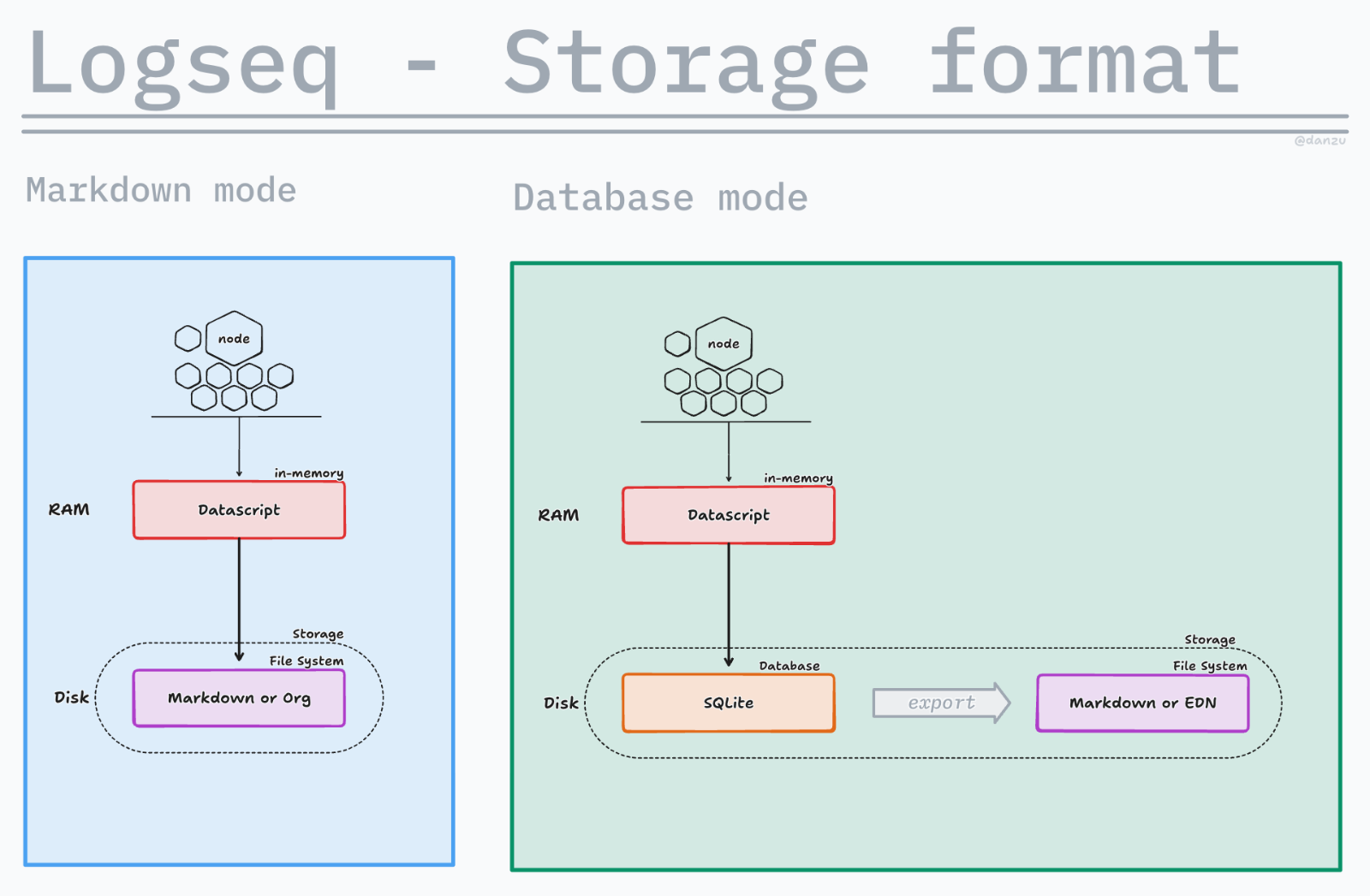
- What does this mean? In the MD version, you can modify your graph by editing the MD files directly. In the DB version you cannot do this. Some flexibility is lost as a result, but in exchange we will get better sync, real time collaboration (RTC), and less data loss.
- The team is looking into the possibility of having continuous real-time export of your database into markdown files, but haven’t committed to doing so. As I understand it, this would be one-way sync, and would not read changes in the markdown files back to the database.
Can I continue using the markdown (OG) version of Logseq?
- Yes, see the official announcement about Logseq OG
- The OG version will be in "maintenance mode" which means it will only be receiving security patches and compatibility updates, no new features.
Can we import our MD graph?
- Yes, you can.
- Note that
#tagsand[[page references]]are handled the same in the MD version but are different in the DB version. (See about NewTags below.) This will affect how your graph gets imported, depending on which options you choose during the import process. You should experiment with different options to see how you want to handle it. Importing will not affect the original MD files. - We recommend playing with the new DB graph on its own for a while first, so you understand how it is different, before importing your old data.
Can I continue to sync Logseq OG?
- Yes, but note that there are now two mobile apps as well. You will need to use the OG versions to sync with the OG desktop version.
- NOTE: they have not yet released mobile apps with the OG name, which means you can't currently have both the new Logseq mobile apps and the OG apps running on the same mobile device. This should change in the near future.
About Logseq DB
Is there a desktop app for the new database version of Logseq?
- You can now download the beta version of the new DB version of logseq directly from the logseq homepage at Logseq.com
- You can download bleeding-edge nightly releases from this page. (You have to be logged in to GitHub in order to see the download links.)
- This app only works with database graphs.
- The DB version also exists now as a web app, which still stores data locally (not in the cloud). https://test.logseq.com/
How do I enable Backup?
- To back up the web-based version of Logseq, use only Chromium-based browsers such as Google Chrome or Edge, and enable the backup feature in the “export” menu in the top-right.
- The backup feature is enabled by default in the desktop version, saving to
~/logseq/graphs/[your-graph-name].
What happened to sync?
- One of the main reasons for the team's decision to switch to a database backend was to ensure fast and reliable sync, and they have delivered on that promise. Not only that, but the new sync solution can now support "Real Time Collaboration" (RTC) between multiple users at the same time.
- However, while there is also a self-hosted sync option, the official sync solution with RTC will not be free. It will be part of Logseq Pro. Read more about Logseq Pro below.
- Below are some links for how to run self-hosted sync. Note that these guides might be out of date.
- During the testing phase, all sponsors ($15/month) and backers ($5/month) have access to the new sync and the new mobile apps.
What new features are in Logseq DB?
What are NewTags?
- Actually, they are just called “tags” but we call them “NewTags” here to make it clear that things have radically changed from the current MD app. This is one of the most exciting features of the DB version and will radically change how you use the app. The short version is that properties are now associated with NewTags, and assigning a NewTag to an item will automatically populate that item with those property fields.
- So, for instance, you could associate “Telephone Number” and “E-mail Address” with
[[Contact]]. - See Luhmann's post on how tags work in Logseq DB for more information.
How and why to extend tags?
- Even better, you can build on existing NewTags by creating tags that inherit the properties of their parent tags. This is called “extending tags.” How this works is explained in this post by @brerlapn.
What is the Library?
- One feature that has gotten very little attention from Logseq over the years is the “namespace” feature, which gives users the ability to have some additional hierarchy. In the MD version this feature was never even properly documented.
- It seems that, in the MD version, the primary use intended for the feature was to avoid conflict between two identically spelled words that have different meanings. For instance, you might want to differentiate a page for “apple” when applied to Apple Computers, and for Apple Pie. You could do this by putting them in separate namespaces:
[[computer/apple]]and[[pie/apple]]. - Now, however, the team has added a new “Library” feature to the DB app, which should make this easier, and make namespaces more useful.
- What is Library? According to the PR for this feature , it is a “page to automatically collect namespace pages.” You can watch the demonstration video on that page, but the idea is simple. If you write
[[computer/apple]]it will actually make it[[library/computer/apple]]and on the page[[library]]you will see an outline of all the page names that have hierarchy. You can edit them by simply dragging and dropping those pages in the outline, and you can add additional namespaces as well. - This should make editing hierarchy much easier, and allow people to give their Logseq notes more structure if they need to.
- Note: this feature is still in development.
What is the MCP and how to use it?
- According to Wikipedia, “a Model Context Protocol (MCP) is an open standard, open-source framework introduced by Anthropic in November 2024 to standardize the way artificial intelligence (AI) systems like large language models (LLMs) integrate and share data with external tools, systems, and data sources.” Even though it was introduced by Anthropic (the makers of Claude AI), it is now widely supported.
- The Logseq MCP can interface with online LLMs like Claude or OpenAI, or offline ones, like Gemma, to let you directly interact with your graph. Like the API, this requires using the desktop app, not the web app (see above).
- Link to the official documentation.
Are there videos to help me learn how to use these new features?
- Yes, check out @Danzu's YT channel.
What is Logseq Pro and what features will be included?
What is Logseq Pro?
- Logseq Pro will include three features: sync, RTC, and Publish. This will hopefully make Logseq profitable and allow for the company to be sustainable over the long term, so the team is putting a lot of work into making sure that these features work flawlessly.
- A Logseq Pro subscription will be required to sync your graphs across devices, but the team are also working on a free self-hosted sync option. (Self-hosted publishing should be possible as well.)
- They have discussed offering academic discounts for Pro. The pricing has not yet been announced, but the regular and discounted subscriptions will probably be in line with the offerings of competitors like Obsidian.
What is RTC?
- A new feature, based on the same technology used to power syncing between your own files across platforms, which allows multiple users to work on a shared graph. We are using RTC to collaborate on this FAQ. RTC will be part of "Logseq Pro."
What is Logseq Publish?
- A planned part of the eventual "Logseq Pro" offerings, publish is already available for those testing out RTC sync. It allows you to selectively publish any page to a server with one click. Eventually, you will be able to publish sections of graphs, or an entire graph, this way. This FAQ was posted using Logseq Publish.
What features have been left out?
What happened to whiteboards?
- Whiteboards have been removed from the DB version of the app, temporarily, but will still work in the MD version of the combined desktop app.
- They will come back after the team decides how best to handle them.
What happened to Zotero?
- Zotero will no longer be supported as part of the core app. One will have to rely on plugins, like Zotero-local. The developer of Zotero-local has recently updated the plugin to work with DB graphs.
About the future of Logseq
When will it be released? What is the roadmap?
- The release of the beta was announced on July 13th, 2026.
Will there be a calendar view?
- Yes, a calendar view is on the roadmap
- No details about what it will look like are available yet
Will the mobile app support plugins?
- It seems that there are plans to do this eventually, but right now the priority is to release the app and sync, so work on this will not happen for some time.
Will we be able to self-host Logseq? Is it open source?
- Yes! The team recently announced plans to make this possible.
- The new self-hosted sync solution is open source.